Free Vivo Demo Removal with Golden MTK Auth Tool v1.0.0 (Download Now)
Free Vivo Demo Removal with Golden MTK Auth Tool v1.0.0 If you need to unlock Vivo Demo, erase user data, fix preloaded issues, read preloader or bypass authorization in Brom...

Security Status: SAFE
Scanned by 65+ antivirus engines • No threats detected
Screenshots & Preview

Click on images to view full size (1 images)
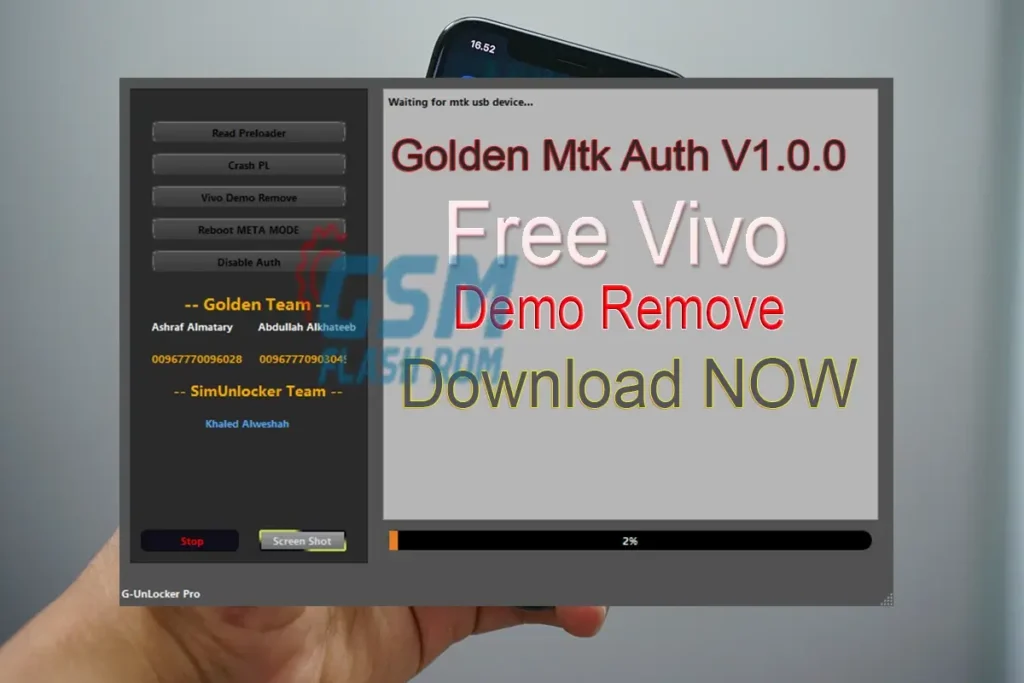
Free Vivo Demo Removal with Golden MTK Auth Tool v1.0.0 If you need to unlock Vivo Demo, erase user data, fix preloaded issues, read preloader or bypass authorization in Brom mode, use the Golden MTK Auth Tool With its META-Unlock section, you can perform tasks such as Reboot in META Mode,
Feature
Unlock Vivo Demo, Erase Data, and More with Golden MTK Auth Tool
Golden MTK Auth Tool v1.0.0 is a powerful utility designed specifically for Vivo smartphones. It allows you to bypass various restrictions and limitations imposed by the device’s firmware, including:
- Vivo Demo Removal
- User Data Erase
- Fixing preloaded issues
- Read Preloader
- Brom Mode Authorization Bypass: in Brom mode, it allows you to flash custom firmware or ROMs onto your Vivo phone.
Key Features of the Golden MTK Auth Tool:
- META-Unlock Section: This dedicated section provides various options for performing tasks in the META mode of your Vivo device. These include:
- Reboot in META Mode: Quickly reboot your Vivo phone directly into META mode, allowing you to access and modify advanced settings.
- Read META Data: read information stored in the META partition of your Vivo device.
- Write META Data: the META partition, allowing you to customize your Vivo phone’s firmware.
How to Install the Golden MTK Auth Tool:
- Download and extract the USB (RAR) file on your computer.
- Run the Golden MTK Auth Tool.exe setup file.
- It will prompt a User Account Control page for permission. Tap Yes.
- Next, click on Install Now in the USB installation window.
- A Windows security message will pop up on the screen. Click on Install.
- Finally, a successful message will appear. Just tap on the Finish button.
Download
Easy Installation
Simple setup process with clear instructions
Safe & Secure
Scanned and verified free from malware
Fast Download
Multiple mirror servers for fastest download speeds
System Requirements
Minimum Requirements
Recommended
- Latest version with all current features
- Bug fixes and performance improvements
- Security updates and patches
- Compatibility improvements
Rate & Review This Software
User Reviews
No reviews yet. Be the first to review!
About the Author / Developer