Download EMT v3.32.00 (EME Mobile Tool). All Versions Available
Download EMT v3.32.00 (EME Mobile Tool) Support Unlock/Relock Bootloader, Factory Reset, and Reset ID for Redmi NOTE 11E/11R_5G (LIGHT), Redmi 10_5G (LIGHT), Redmi 10 PRIME_5G,, and POCO M4_5G (LIGHT) Xiaomi...

Security Status: SAFE
Scanned by 65+ antivirus engines • No threats detected
Screenshots & Preview
Click on images to view full size (1 images)
Download EMT v3.32.00 (EME Mobile Tool) Support Unlock/Relock Bootloader, Factory Reset, and Reset ID for Redmi NOTE 11E/11R_5G (LIGHT), Redmi 10_5G (LIGHT), Redmi 10 PRIME_5G,, and POCO M4_5G (LIGHT) Xiaomi models; as well as A77 (A77, A77T), R11 (R11, R11T), R11 PLUS (R11PLUST, R11PLUS, R11PLUSKT, R11PLUSK), R11S (R11S, R111ST),, and R11S PLUS (R102SPK). We have also updated solutions for the MIX model with MIUI 9, 10, and 11 reset ID solutions, improved time-outs per module up to 180 seconds, and made additional improvements such as fixing known bugs.
What’s New Added: EMT v3.32.00 (EME Mobile Tool)
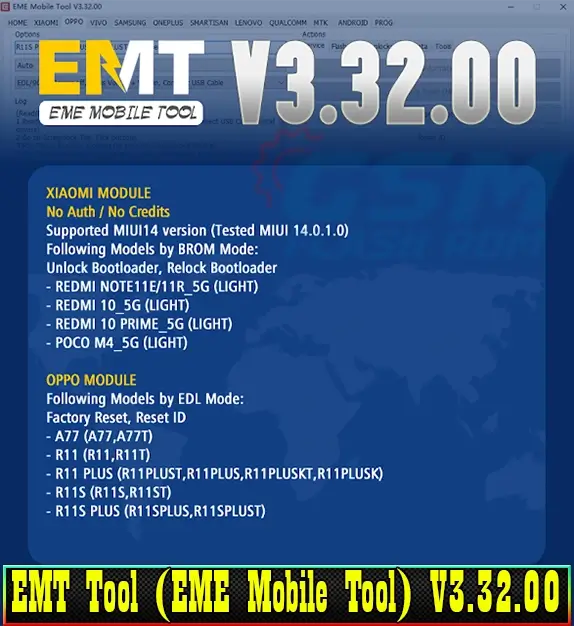
| XIAOMI MODULE: No Auth/ No Credits Supported MIUI14 version (Tested MIUI 14.0.1.0) Following Models by BROM Mode: Unlock Bootloader, Relock Bootloader – REDMI NOTE11E/11R_5G (LIGHT) – REDMI 10_5G (LIGHT) – REDMI 10 PRIME_5G (LIGHT) – POCO M4_5G (LIGHT) OPPO MODULE: Following Models by EDL Mode: Factory Reset, Reset ID – A77 (A77, A77T) – R11 (R11, R11T) – R11 PLUS (R11PLUST, R11PLUS, R11PLUSKT, R11PLUSK) – R11S (R11S, R11ST) – R11S PLUS (R11SPLUS, R11SPLUST) CHANGED – Added Redmi NOTE 11E/11R_5G, Redmi 10/10 PRIME_5G, POCO M4_5G, etc. models, Supported MIUI14 Unlock/Relock Bootloader, etc. functions – Added OPPO A77, R11, and R11S series models, reset ID, etc. functions – Updated MI MIX model, supported MIUI 9, 10, and 11 reset id solutions – Improved ONEPLUS: some of model solutions improved timeout to 180 seconds for each module – Fixed Known bugs |
Follow to install the EMT v3.32.00 (EME Mobile Tool):
- Save the EMT v3.32.00 setup file to your computer after downloading it from a reputable source.

- As an administrator, run the EMEV3.31.00.exe file.
- A configuration window will display. “Next,” “I agree,” and “Install” will appear.

- Wait for the setup procedure to finish, then click “Finish” to complete the installation.

- Log in if you have an account. If you do not already have an account, create one by entering your email address, password, name, and phone number in the registration section. Then press the “Register” button.
- Wait for the gadget to start operating after the setup is complete and your account is set up.
- After the login window has been activated, select “Login.”

- The EMT Tool (EME Mobile Tool) V3.31.00 is now available for PC usage.
Download EMT v3.32.00 (EME Mobile Tool). All Versions Available
File Size: 25. MB
Easy Installation
Simple setup process with clear instructions
Safe & Secure
Scanned and verified free from malware
Fast Download
Multiple mirror servers for fastest download speeds
System Requirements
Minimum Requirements
Recommended
- Latest version with all current features
- Bug fixes and performance improvements
- Security updates and patches
- Compatibility improvements
Rate & Review This Software
User Reviews
No reviews yet. Be the first to review!
About the Author / Developer